
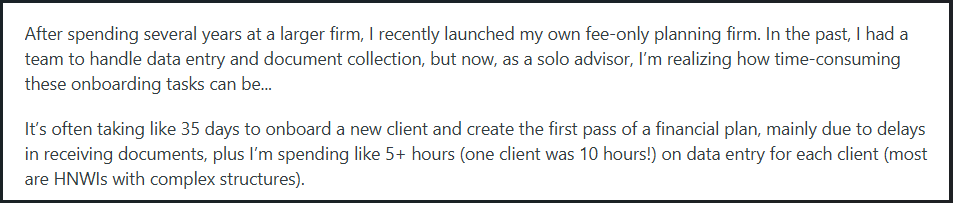
Client onboarding has quietly become one of the main bottlenecks for professional service firms. It’s a drain on time and morale, particularly for firms that don’t have the luxury of a dedicated admin team. And this isn’t just theory since client-facing professionals openly share how overwhelming the process can become:

Source: Reddit
The problem is obvious, but what’s the solution here?
The best client onboarding software makes the difference between smooth client relationships and weeks of unnecessary back-and-forth for businesses handling sensitive information or large document packages. With that in mind, allow us to show you the finest platforms for client onboarding.
Top 5 client onboarding tools reviewed and ranked
Before we show you our top picks, let’s take a moment to explain the methodology. We evaluated each platform based on key features like security, ease of use, automation, document collection workflows, and overall client experience. This review highlights the solution that performs best across all those criteria, along with several niche-focused tools that shine in specific scenarios.
1. Content Snare: Best client onboarding software overall

Content Snare stands out as the most complete client onboarding software for teams that need a genuinely easy way to collect documents and information from clients. This platform replaces endless email chains with a guided portal where clients know exactly what to provide, while you get to stay on top of every request without chasing anyone.
According to a recent survey, businesses using Content Snare spend 71% less time gathering information and see a 67% reduction in stalled projects. Here are some features that make it possible:
- Fully editable onboarding form templates: That includes both general and industry-specific client onboarding templates you can customize in minutes.
- Automatic reminders: Scheduled follow-ups keep clients on track without manual nudges.
- Rich instructions: Content Snare lets you add text, images, videos, or other kinds of examples to walk clients through complex requests.
- In-form comments: This helps you clarify specific items directly inside the request to eliminate confusion.
- Military-grade security: The system relies on multiple cybersecurity mechanisms and is ISO 27001-certified.
This is how one of the users described their very first experience with using Content Snare for client onboarding:

Content Snare has earned thousands of 5-star reviews and is trusted by more than 1,600 businesses worldwide, including accounting firms, bookkeepers, financial professionals, legal teams, and digital agencies.
If you want to streamline onboarding with a tool that’s secure and simple for clients to use, try Content Snare free for 14 days and see the difference for yourself.
2. Hudu: Best for IT asset documentation during onboarding

Hudu is built for MSPs and IT service providers looking for a structured way to capture technical details when bringing a new client on board. Instead of piecing together spreadsheets and notes, teams can use Hudu to store everything in one place (think passwords, network diagrams, hardware lists, software inventories, and similar).
It’s a practical choice for IT professionals who want consistent documentation without adding extra admin work. Some of Hudu’s main features include:
- Centralized IT asset records: This keeps hardware, software, and credentials organized from day one.
- Standardized onboarding checklists: You can make sure every new client starts with the same documented process.
- Password and credential vaults: Hudu helps you secure storage for sensitive access details.
- Flexible documentation templates: You can quickly create repeatable structures for new client setups.
While Hudu isn’t a general-purpose onboarding or document collection tool like Content Snare, it does an amazing job in its specific domain. MSPs who want to keep their documentation in good shape will find Hudu fits right into their day-to-day work.
3. LEXReception: Best for law firms needing call-driven intake and screening

LEXReception takes a different approach from most intake tools by focusing on the first touchpoint many law firms rely on: the phone call. Instead of hoping prospective clients leave enough details in a voicemail or trying to catch every call in-house, legal firms can use LEXReception’s trained legal receptionists to gather essential case information right away, which is really helpful for practices managing high inquiry volumes or time-sensitive matters.
Here are a few areas where this client onboarding software stands out:
- Live call intake: Receptionists collect key facts during the call, giving attorneys clearer context before they follow up.
- Scripted screening questions: Firms can define what needs to be asked for each practice area to help receptionists filter out unqualified leads.
- Integrated message delivery: Intake notes and summaries are passed directly to the firm, which keeps attorneys in the loop without redundant admin steps.
- 24/7 availability: Calls are answered around the clock, which is a big plus for firms that don’t want to miss urgent inquiries.
Though LEXReception isn’t built for full document collection or structured onboarding, it fills an important gap for firms that want to capture accurate case details the moment someone reaches out.
4. AgencySimplifier: Best for agencies using client onboarding checklists

AgencySimplifier is a good fit for teams that like to keep their process steady and straightforward when kicking off new client work. Many creative teams that deliver the same types of services again and again appreciate the platform’s dashboard because it improves client communication through data visualization. In addition to that, AgencySimplifier is a solid client onboarding software due to these functionalities:
- Customizable checklists: This client onboarding software helps you create step-by-step sequences that leave no room for confusion.
- Client-facing task views: Give clients a simple way to see what’s expected without overwhelming them.
- Reusable workflow templates: Build once, reuse often. This is super helpful for agencies managing similar project types.
- Internal notes and instructions: You can also provide guidance for your team on the go, so nothing slips through the cracks during onboarding.
If your creative team relies heavily on checklists to keep projects on course, this tool can slip into your routine without missing a beat.
5. PreciseFP: Best for financial advisors needing client risk-profiling

Financial advisors who run risk-profiling assessments and maintain compliance-ready records often choose PreciseFP. This client onboarding software goes beyond simple form-building by helping advisors collect data that feeds directly into planning conversations and suitability checks. Here’s what makes PreciseFP stand out:
- Built-in risk tolerance questionnaires: Advisors can send professional and compliant assessments that clients can complete online.
- Data validation and structured fields: This helps you keep client inputs accurate and ready for use in planning tools.
- Integrations with major financial platforms: It’s easy to sync data into CRMs and financial planning software to reduce duplicate or manual entries.
- Customizable client profiles: PreciseFP also enables you to create branded profiles that fit your advisory style and the way you gather client information.
PreciseFP isn’t trying to handle broad document collection or general onboarding tasks. However, it does a fine job giving advisors dependable and well-organized data that supports better financial recommendations.
Pick a tool that actually moves the needle
Finding the best client onboarding software doesn’t mean ticking off feature boxes. On the contrary, your goal should be to pick something that genuinely lightens your workload and sets clients up for a smooth start. Each platform on our list brings something different to the table, but the key is matching it to the way your team already works. That way, onboarding becomes a natural extension of your process rather than another chore to manage.
If you want a platform that covers most use cases without feeling complicated or heavy-handed, Content Snare is the one worth testing first. It’s built to handle secure document collection and automate follow-ups while giving your team more breathing room.
Improve client onboarding with Content Snare
Stop getting lost in emails, attachments and outdated digital tools. Content Snare is modern onboarding software that clients actually love to use.
FAQ
What should I look for in client onboarding software?
The best client onboarding software should make it easy to gather information, guide clients through the first steps of working with you, and reduce manual admin tasks. Look for features like clear request flows, secure data handling, automation options, third-party integrations, and an interface your clients won’t struggle with.
How does Content Snare improve communication during onboarding?
Content Snare keeps all conversations tied directly to each request, so clients always know what you’re referring to and you don’t lose track of important clarifications. This makes the onboarding process far more organized than email and helps both sides stay aligned as information comes in.
Do all onboarding tools work for every type of business?
Not necessarily. Some platforms are built for broad use across many industries, while others specialize in specific fields like legal, marketing, financial services, or IT. The best choice depends on your workflow and the type of information you collect.
Is Content Snare suitable for teams with strict compliance requirements?
Yes, Content Snare is designed with strong data protection in mind, offering features like encryption, user authentication, firewalls, network isolation, and a range of additional mechanisms that support firms with heightened compliance needs. It’s a good match for teams that must protect sensitive client information from the start.
Deixe um comentário