

Why WhatsApp Leads Stop Replying After a Quote and What to Send Next

Someone clicks your Facebook ad, opens WhatsApp, and asks, “How much does it cost?”
Your sales team sends a quote. The message is delivered, but the conversation stops.
Should you follow up the next day? What should you say? And how do you avoid sending another reminder to someone who has already replied?
These questions appeared in an October 2026 discussion among people exploring Facebook-to-WhatsApp lead follow-ups. One challenge stood out: keeping follow-up schedules aligned with actual conversations so customers do not receive messages they no longer need.
For marketing teams, the problem goes beyond unanswered messages. The real challenge is knowing when another message could help, what information it should contain, and when to stop.
Chapters
Why Do WhatsApp Leads Stop Replying After a Quote?
A pricing question shows interest, but it does not always signal purchase readiness.
Some prospects compare several providers before deciding. Others may need approval from a manager, more information about what’s included, or time to reconsider their budget.
Sometimes the quote simply fails to address the customer’s real concern.
Imagine a prospect requesting a website design quote.
The salesperson responds:
“Our website package costs $800.”
The price is clear, but important questions remain. Does it include mobile optimization? How many pages are covered? What happens after the website launches?
The customer may have lost interest. But silence alone cannot establish why.
Before following up, consider where the conversation stopped.
| Where the conversation stopped | Possible unanswered question | Better follow-up direction |
|---|---|---|
| Immediately after pricing | What am I paying for? | Explain the package value |
| After comparing options | Which option fits my needs? | Clarify meaningful differences |
| After discussing features | Will this solve my problem? | Answer a specific concern |
| Before scheduling | What happens next? | Offer a simple next step |
| After requesting more time | Can I decide later? | Respect the agreed timeline |
These are possible explanations, not proven reasons for every unresponsive lead.
The goal is to identify information that might help the customer make a decision, rather than treating every unanswered message as an invitation to send another reminder.
What Should You Send Instead of “Just Following Up”?
A generic message such as “Hi, are you still interested?” is easy to write, but it adds little value.
A stronger follow-up connects directly to what the customer previously asked.
1. When the Customer Disappears After Seeing the Price
If the quote lacked context, explain what is included rather than immediately offering a discount.
Example:
“Hi Alex, one detail I didn’t mention earlier: the $800 package includes five pages, mobile-friendly design, and a contact form. If you’re comparing options, I can also explain which features are optional.”
This helps the customer understand the offer without demanding an immediate decision.
2. When the Customer Is Comparing Two Options
Some leads need clarification, not another sales pitch.
Example:
“Hi Sarah, the main difference between the two plans is ongoing support. The basic package covers setup, while the other includes monthly assistance. Happy to clarify which would better suit your team.”
This approach works when the prospect has already expressed interest in comparing plans.
3. When the Customer Has Asked About an Appointment
A scheduling-related follow-up should remove friction.
Example:
“Hi Daniel, regarding the consultation we discussed, I can share the available times for this week if you’d like to continue.”
The message provides a clear next step while allowing the customer to decline.
These examples are illustrative templates, not messages with independently verified conversion results.
A useful follow-up provides information or removes an obstacle. It should not simply repeat an unanswered request.
Match the Follow-Up to the Customer’s Buying Stage
The same reminder should not go to every lead.
Someone who has requested a quote, someone evaluating a product, and someone ready to book an appointment have different needs.
A simple classification can help.
| Lead stage | Relevant content | Objective |
|---|---|---|
| Initial inquiry | Short explanation or example | Improve understanding |
| Quote received | Pricing details or package breakdown | Clarify value |
| Comparing options | Relevant product differences | Support evaluation |
| Ready for next step | Booking or consultation details | Make action easier |
| Not interested | No further promotional messages | Respect the decision |
Teams can use this framework even without advanced lead-scoring software.
For small operations, maintaining a record of the customer’s last question, latest response, and intended next step may be enough to improve follow-up relevance.
However, the lead’s status must be reviewed before another message is sent.
How to Avoid Following Up With Leads Who Already Replied
This is one of the most important parts of a reliable follow-up process.
Consider a prospect who receives a quote on Monday. A follow-up is prepared for Tuesday.
Before Tuesday arrives, the prospect replies, asks another question, and schedules a consultation.
If the follow-up list is not updated, the customer might still receive a generic reminder asking whether they are interested.
That creates an unnecessary and confusing experience.
A straightforward solution is to treat conversation status and sending plans as separate things.
Check the Latest Conversation Status
Before preparing or starting a follow-up campaign, review each contact.
| Current customer status | Recommended action |
|---|---|
| No reply, still eligible for follow-up | Check whether another useful message is appropriate |
| Replied with a question | Remove from the generic follow-up list and answer |
| Appointment booked | Stop sales follow-ups; use only agreed appointment communications |
| Requested more time | Respect the requested timeline |
| Declined or opted out | Stop the relevant outreach |
| Status uncertain | Review the conversation manually before sending |
This check becomes particularly important when several employees handle WhatsApp conversations.
Add a Final Review Before Sending
A practical workflow is:
- Review the latest messages and customer status.
- Remove contacts who replied, booked, declined, or opted out.
- Confirm permission and identify recipients who still need relevant information.
- Prepare the appropriate follow-up content.
- Recheck the recipient list immediately before sending.
For teams using an automated follow-up system, reply detection and cancellation should be verified capabilities. The system should check for new responses before executing pending messages.
For teams using a basic sender tool, employees may need to perform this review manually.
A messaging tool can help execute a prepared campaign. That does not mean it automatically knows whether another follow-up is appropriate.
How to Organize a WhatsApp Follow-Up Campaign
Once the team has identified which leads should receive a message, the next challenge is preparing it accurately.
A spreadsheet can provide a useful starting point.
| Contact | Last inquiry | Message purpose | Status |
|---|---|---|---|
| Alex | Website pricing | Explain package inclusions | Awaiting reply |
| Sarah | Plan comparison | Clarify differences | Awaiting reply |
| Daniel | Consultation | Confirm next step | Review before sending |
These are illustrative records, not actual customer data.
Separate contacts by the information they need rather than placing every unanswered lead into one generic campaign.
For teams preparing permission-based outreach, a WhatsApp Sender such as RocketSender can help import Excel contacts, personalize messages using spreadsheet fields, and organize campaigns in a web dashboard. Sending then takes place through its Chrome extension in WhatsApp Web.
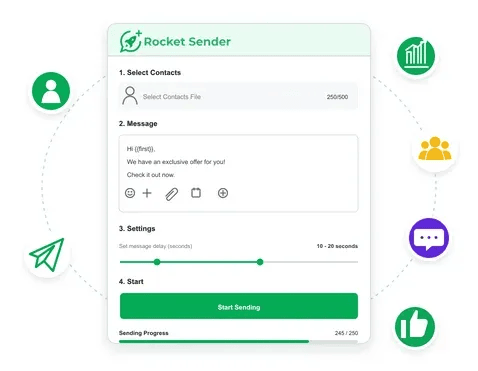
This workflow is useful when the team has already selected the appropriate recipients and wants to reduce repetitive campaign preparation.
RocketSender’s dashboard is designed for preparing and managing sending tasks. It should not be treated as an automatic lead qualification system or assumed to detect customer replies and cancel follow-ups.
That distinction keeps the technology aligned with its actual purpose: helping teams execute a messaging plan they have already reviewed.
When Is a Browser-Based Bulk Sender Enough?
Not every business needs a separate campaign dashboard or full CRM.
A small training provider, for example, may already maintain an Excel list of prospective students who requested course information.
Some need pricing details. Others want upcoming class dates or information about available programs.
After checking conversation status and confirming which recipients still need a response, employees can prepare the relevant messages directly through a browser extension.
A WhatsApp Bulk Message Sender extension such as WA Bulk Message Sender supports Excel imports, personalized messages, adjustable sending intervals, pause-and-resume controls, and sending-result exports through WhatsApp Web.
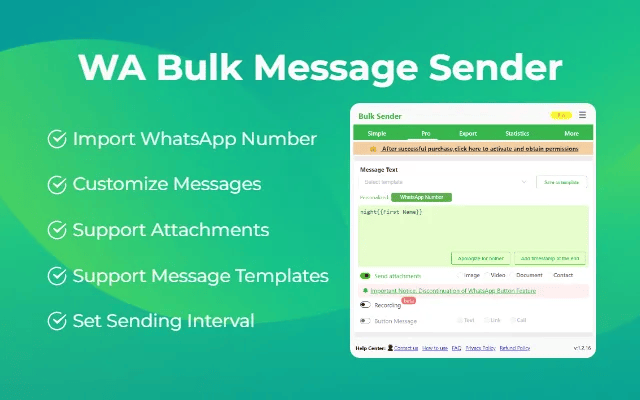
These features can help teams manage straightforward outbound messaging tasks without repeatedly copying information between spreadsheets and individual chats.
However, sending progress is not the same as conversation management.
The extension does not independently determine whether a customer has become interested, lost interest, or already received an adequate answer.
When a business requires shared conversation histories, reply-triggered actions, or automatic cancellation of pending follow-ups, it should evaluate a CRM or another system with those verified capabilities.
How to Measure Whether WhatsApp Follow-Ups Actually Work
Sending more messages does not necessarily produce more meaningful conversations.
Instead of evaluating campaigns purely by sending volume, marketing teams should measure what happens afterward.
| Metric | What it measures |
|---|---|
| Follow-up reply rate | Percentage of contacted leads who reply |
| Qualified reply rate | Percentage of replies indicating relevant interest |
| Next-step conversion rate | Percentage of contacted leads who agree to an appointment, call, or another defined action |
| Opt-out rate | Percentage of contacted leads who request no further messages |
For example, a business may discover that prospects frequently stop responding immediately after receiving a quote.
That pattern could indicate unclear pricing, poorly qualified advertising traffic, or insufficient explanation of the offer.
The team can then test improvements to its quotation process rather than simply increasing follow-up frequency.
These metrics require clearly defined measurement periods and consistent contact records. A sender’s progress report alone may not provide reply or conversion data.
The purpose of measurement is to identify where conversations become less useful and what the business can improve.
Frequently Asked Questions
Why do WhatsApp leads disappear after asking for a price?
Possible reasons include budget concerns, comparison shopping, missing information, or changing priorities. A business should review the earlier conversation before deciding whether another message would be useful.
How soon should I follow up with an unresponsive WhatsApp lead?
There is no universal best interval. Consider the urgency of the original inquiry, the customer’s stated timeline, and whether another message adds value. Confirm the recipient still expects and permits further contact.
Can a WhatsApp sender stop a follow-up when someone replies?
Not necessarily. Basic sender tools focus on preparing and sending outgoing messages. Automatic reply detection and cancellation require specific, verified functionality. Without it, teams should review conversation status manually before sending.
Better Follow-Ups Start With Better Decisions
When a WhatsApp lead asks for a price and stops replying, the answer is not automatically another reminder.
The more useful first step is to review what the customer asked, what information was provided, and whether anything important remains unclear.
If a follow-up is appropriate, it should help the customer evaluate the offer or understand the next step.
If the customer has already replied, booked an appointment, declined, or opted out, the sending plan should reflect that change.
Messaging tools can make contact preparation and delivery easier, but the quality of the conversation still depends on the decisions made before sending.
An effective WhatsApp follow-up strategy is not about reaching every silent lead again. It is about giving interested customers the information they need, at the right moment, without unnecessary repetition.
Other Interesting Articles
- AI LinkedIn Post Generator
- Gardening YouTube Video Idea Examples
- AI Agents for Gardening Companies
- Top AI Art Styles
- Pest Control YouTube Video Idea Examples
- Automotive Social Media Content Ideas
- Plumber YouTube Video Idea Examples
- AI Agents for Pest Control Companies
- Electrician YouTube Video Idea Examples
- How Pest Control Companies Can Get More Leads
- AI Google Ads for Home Services
- 60-Second Training Videos Are the New Corporate Standard
- Cybersecurity PR Pricing: Retainers, Deliverables & ROI
- Best AI Tools for Product Consistency in E-Commerce Video
Master the Art of Video Marketing
AI-Powered Tools to Ideate, Optimize, and Amplify!
- Spark Creativity: Unleash the most effective video ideas, scripts, and engaging hooks with our AI Generators.
- Optimize Instantly: Elevate your YouTube presence by optimizing video Titles, Descriptions, and Tags in seconds.
- Amplify Your Reach: Effortlessly craft social media, email, and ad copy to maximize your video’s impact.
The post Why WhatsApp Leads Stop Replying After a Quote and What to Send Next appeared first on StoryLab.ai.
Deixe um comentário