

YouTube Creator’s Must-Have: The Ultimate Guide to Making Royalty-Free Music with GAM

Why does your video always give people a sense of déjà vu? Perhaps the root of the problem lies beyond the visual, when the transitions you’ve carefully crafted are paired with the same rhythms used by countless others; when the emotions you want to convey are confined by music with limited styles.
GenerateAiMusic, a powerful music generator, changes all that. It not only provides royalty-free music but also tailors every melody specifically for your work. Freely choose music styles and moods, generate multiple versions for comparison, and select the one that perfectly matches your video’s rhythm and visual emotion. This way, the images and melodies blend perfectly, making your YouTube channel unforgettable to the audience at first glance.
Chapters
Common Issues with Traditional Royalty-Free Music
Why do your videos, no matter how polished the visuals or meticulous the editing, always feel like they’re using a template when background music plays, lacking any distinct style of their own? You want to switch tracks, only to find that mainstream royalty-free music libraries offer a limited range of styles, while popular tracks have been reused by countless channels.
In fact, these problems plague most creators, primarily manifesting in three ways:
Music is Reused Across Numerous Channels
Popular tracks in music libraries have almost become a shared resource among creators, cropping up on countless channels. The video you painstakingly crafted might just feature the same melody others are using. Imagine viewers clicking on a food blogger’s cooking showcase, a travel vlogger’s aerial footage, and an influencer’s daily vlog all in one day, only to hear the same familiar guitar melody playing on repeat. This repetitive use of music rapidly erodes the uniqueness of each piece, turning what should be personalized expressions into standardized content churned out on an assembly line.
Limited Variety in Music Library Styles
Many platforms boast “music libraries with hundreds of thousands of tracks”, but in reality, the range of music genres is quite limited; electronic, pop, and light music make up the vast majority. While there seems to be a wealth of options, the content is highly homogenized, making it difficult to meet the diverse needs of different video content and emotional tones. When creators need to convey more specific emotions, such as a tense plot buildup or a restrained emotional monologue, they often struggle to quickly find a track that matches the mood, even in a massive music library. They end up repeatedly auditioning highly similar-sounding music, settling for a mediocre melody that barely fits.
Challenges in Building Channel Identity
Due to limited musical styles and their repetitive use across numerous channels, creators struggle to establish a distinctive channel identity through their soundtracks. Over time, videos from different accounts become nearly indistinguishable aurally, leaving viewers with a generic impression. As users scroll through content, they find it difficult to recall specific videos, only thinking “I seem to have watched something similar before,” leading to a continuous erosion of content recognition and long-term memorability.
How GAM Solves Copyright and Repetition Issues
Freely Select Music Styles and Moods
Custom Mode
Precision Customization: GenerateAiMusic allows you to describe music with pinpoint accuracy, just like a director explaining a plot. No more sifting through vast libraries for vaguely matching tracks—simply define the core emotion and specific style you need. Navigate to Create Song, the core feature section of GenerateAiMusic.
In the Style input box, you can type in any music style, tempo, atmosphere, mood, primary instruments, and musical elements you desire. Alternatively, you can select the style elements that randomly appear below the input box to generate music instantly.
For instance, if you are composing music for a game, you can input “8-bit retro Rock-videogame fusion, Guitar Drop, dark chiptune harmonies, Synth, NES”. Then, enter the lyrics in the Lyrics text box and click the Create button at the bottom of the page. GenerateAiMusic will quickly produce a piece of game soundtrack that boasts a strong retro pixel-game style, while integrating rock elements and a dark, moody atmosphere.
When it comes to the lyrics writer section, GenerateAiMusic also offers a highly flexible creative space. You can either manually enter the full lyrics in the Lyrics text box or click Generate Lyrics, then input a theme or keywords to let the AI automatically generate lyrics with a coherent structure and consistent mood. For example, by entering keywords such as “cyber battle, final boss, awakening, dark future”, the system can produce lyrics that fit the game’s worldview around these motifs—including verses, choruses, and bridges—enhancing the music’s narrative depth.

Simple Mode
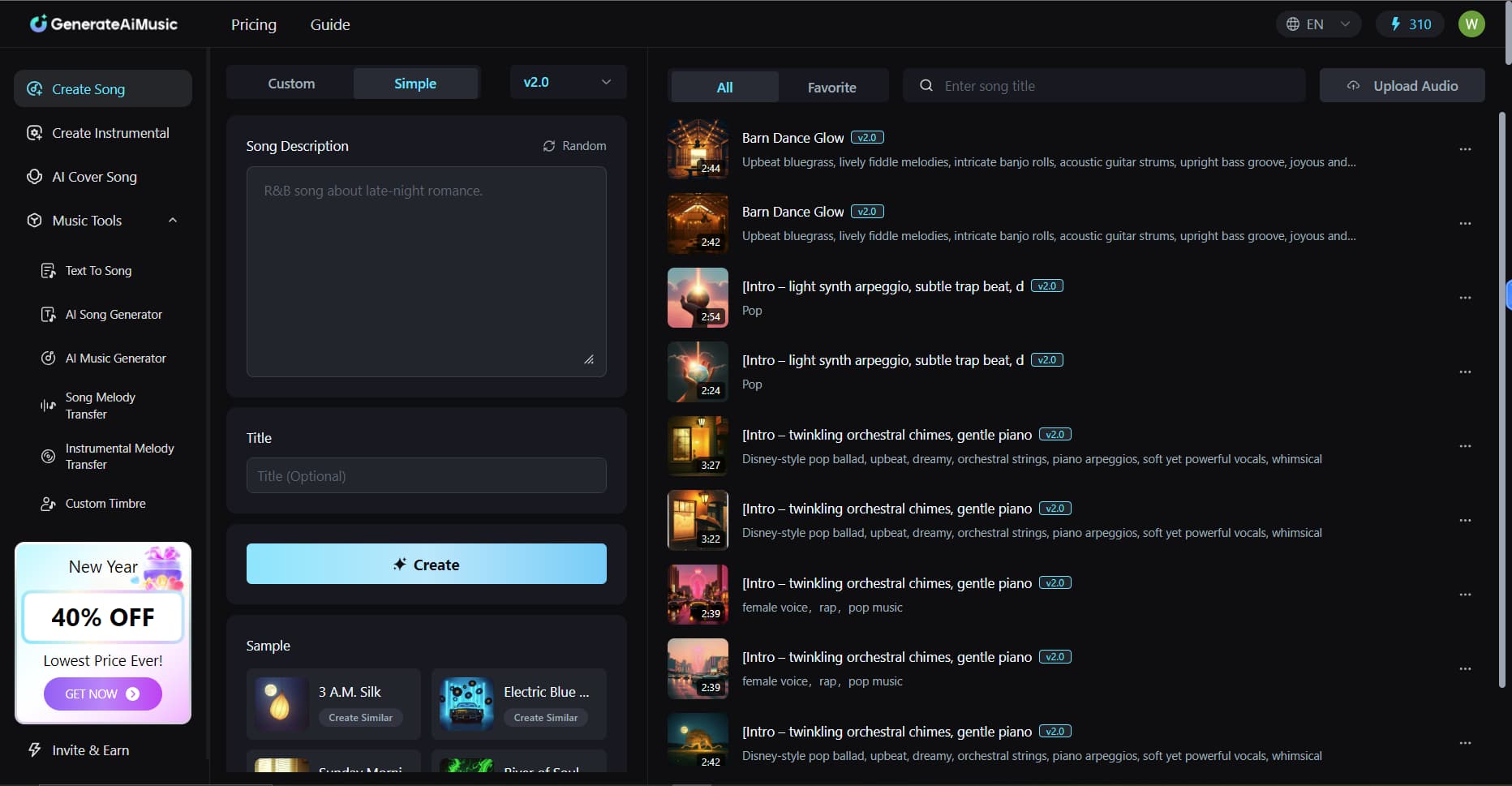
Natural Description: GenerateAiMusic also offers a Simple mode for users less familiar with professional music terminology. Compared with Custom Mode, Simple Mode is more intuitive and has fewer features, making it ideal for complete beginners. All you need to do is describe the vibe or purpose of the song in the Song Description section—for example, “soft music for strolling through the city at night” or “background music for romantic picnics or dates”. Click Create, and the system will generate original music that meets your requirements based on this brief description.
If you have higher expectations for the music, you can also use a more precise and vivid description. For instance, input “Uplifting Progressive House track with euphoric chord progressions and soaring vocal pads, building to an emotional climax perfect for festival sunrise sets”. Upload the lyrics and click Create, and a celebratory soundtrack perfectly suited for country dances and pastoral landscapes will be born. Even in Simple Mode, it generates original music that better aligns with visuals and emotions, making the audio-visual experience more natural and vivid.
Random Style
If you’re still in the stage of seeking inspiration, why not try the Random Mode to generate music styles randomly? Simply click Random above the Style input box to discover a variety of unexpected, creative tunes—perfect for exploring ideas or finding surprising sound effects.
GenerateAiMusic’s powerful system creates highly relevant original music based on your description, ensuring every melody achieves deep emotional resonance with your visuals. Music is no longer just a background sound casually added in the post-production phase; instead, it participates in narrative and atmosphere building from the very beginning of the creative process, unifying the visuals and audio into a cohesive whole.
Generate Multiple Versions for Comparison
Multi-Version Generation: GenerateAiMusic supports generating multiple versions of music based on the same settings. Even with the same set of mood and style instructions, GenerateAiMusic can produce different versions that each emphasize distinct melodic directions, orchestrations, and rhythmic details, providing creators with a diverse range of creative drafts. If you are not satisfied with the generated music, you can find the menu button on the far right of the track, select Recreate, and the lyrics and style parameters of the song will instantly populate the text boxes. You can then freely adjust any unsatisfactory parts and generate a new version with a single click.
Preview Comparison: Beyond this, creators can preview and compare different versions of music on GenerateAlMusic. Each generated track is arranged into a playlist on the page, allowing users to play, switch, and compare them one by one, just like listening to music in a music app. A progress bar at the bottom of the page can be freely dragged to repeatedly preview specific melodies or rhythm changes, enabling precise control over every detail.
For example, if you’re scoring a travel vlog, you can generate three or four different versions of upbeat guitar tracks using GenerateAlMusic. Play them one by one in the playlist to feel the differences in tempo and emotional intensity, then select the one that best matches the visual mood. Click the star icon to bookmark this track for quick access later. During previews, if you feel a particular melody drags slightly over a specific shot, click “Recreate” to return to the text box. Adjust rhythm keywords or add mood prompts like “fast-paced” or “mid-tempo groove” to generate new versions. This iterative process allows you to continually experiment and fine-tune until you discover the perfect soundtrack that seamlessly matches both visuals and rhythm.
Download Music and Licensing Files
After the music generation is completed, you can click the menu button to the right of the track you wish to download, find the Commercial License option to obtain the authorization certificate, and then select your preferred download format. GenerateAiMusic supports downloads in MP3 and WAV formats. Whether you publish your content on YouTube, TikTok, or other platforms, this music can be legally used for commercial purposes. This effectively avoids copyright disputes and allows creators to use the music with complete peace of mind.
Creators can use the generated music in the following scenarios:
- Travel or lifestyle vlogs: Score your daily vlogs with unique music, ensuring your videos boast a distinct style and can be published legally.
Short-video ads & promotional videos: Use the music for brand promotion or product showcases—copyright concerns are eliminated, making it ideal for commercial applications. - Games, animations, or narrative short films: Customize music to match the mood of specific scenes, enhancing the immersive experience for audiences.
Social media content: Directly use the music on platforms like YouTube, TikTok, and Instagram without worrying about content removal or copyright infringement.
Whether for personal creations or commercial projects, you can quickly obtain high-quality, licensable original music on GenerateAiMusic, effortlessly elevating the professionalism and recognizability of your works.
How to Create Royalty-Free Music For YouTube with GAM
Define Video Type and Music Purpose
Before using GenerateAlMusic to create music for your YouTube videos, first clarify your video type and the specific purpose of the music. Different video genres require distinct styles and rhythms to enhance visual impact and emotional atmosphere. Otherwise, even visually stunning content may feel jarring or lack immersion if paired with unsuitable music.
Here are some common video genres and specific uses for music, serving as a reference for your music creation:
- Travel Vlogs / Life Journals: Upbeat guitar, light music, or pop rhythms. Ideal for daily recordings or scenic tours, these sounds keep the visuals relaxed and natural while enhancing the audience’s immersive experience.
- Gaming Clips / Action Footage: Electronic, rock, or uptempo tracks. Perfect for combat, competitions, or tense moments, they amplify the sense of rhythm and tension, making every movement and shot more impactful.
- Narrative Shorts / Commercial Promotions: String music, ambient soundscapes, or modern melodies. Suitable for emotional buildup, climactic scenes, or brand showcases, they lend a professional touch to the video while boosting audience memorability and emotional resonance.
- Food / Cooking Videos: Lighthearted, brisk melodies. Fitting for showcasing cooking processes or food close-ups, they stimulate the audience’s appetite and elevate the viewing experience.
Once you’ve defined the video type and music purpose, you can precisely select the music style and rhythm based on the video content. This ensures the generated music perfectly complements the visuals, enhancing the overall professionalism and uniqueness of your work.
Determine Lyrics and Style Settings
Before generating music for your video, consider what you want the music to convey. Music isn’t just background noise—it can enhance the visual atmosphere, guide the audience’s emotions, and even make the video’s story more complete. Defining your creative goals and core emotions is the first step toward generating high-quality original music.
To better align the music with the visuals, you can start with the following three aspects:
Define the core emotion: Figure out the feeling you want your video to evoke in the audience. For example, travel or daily vlogs should be lighthearted and relaxing; sports, fitness, or action clips need to be energizing and dynamic; while narrative shorts, suspense, or thriller videos should carry tension and intrigue to build emotional stakes. Once the core emotion is defined, you can select melodies and tempos that match it, allowing the music to naturally amplify the visual atmosphere.
Define the theme or keywords: If your video has a narrative or emotional expression, add brief keywords in the input box to ensure the music resonates with the content. For a lighthearted atmosphere, enter prompts like “Upbeat guitar, bright piano, cheerful rhythm.” For suspenseful scenes, input “Deep strings, crescendo rhythm, tense ambiance” to generate music that matches the mysterious tension.
Match rhythm to visuals: When setting the style, consider the pace of your video editing and visual transitions. Action, sports, or competitive scenes pair well with rhythmically strong, drum-driven music to amplify tension and dynamism. Conversely, slow-paced landscapes, slice-of-life moments, or emotional build-up shots benefit from soft, soothing melodies that relax viewers or evoke resonance. This approach ensures music not only complements visuals but also guides audience emotions, creating a cohesive and professional audiovisual experience.
By defining these elements in advance, you can incorporate emotion, visuals, and narrative flow into your music creation before composition begins. making every piece of melody more targeted and avoiding the mindless use of stock library tracks. As a result, the music becomes more than just a supporting element—it actively participates in the video’s storytelling and atmosphere, elevating your work to a more professional level and making it more impactful for your audience.
Obtain Commercial Licensing for a Customized Audio-Visual Experience
After generating and downloading music via GenerateAlMusic, you not only gain commercial licensing rights but can also deeply integrate the music with your videos to create an ultimate audio-visual fusion experience. Music transcends mere background accompaniment to become a key element in storytelling and pacing: melodies in opening sequences, endings, transitions, or climactic moments can precisely mirror visual shifts, simultaneously guiding viewers’ sight and sound to amplify immersion.
For game commentary or esports highlights, intense rhythms and electronic sound effects can match rapid visual cuts, amplifying the excitement of match climaxes. For tech product reviews or science videos, modern synth melodies can emphasize pacing, keeping viewers focused on content while maintaining a relaxed viewing experience.
With GenerateAlMusic, you can integrate music into your video narrative from the creative stage, ensuring melodies and rhythms naturally resonate with visuals. By skillfully aligning musical pacing with visual rhythms, your videos gain professional polish while delivering genuine immersive experiences. This approach helps your YouTube channel videos stand out amidst competitive content, making them more likely to earn subscriptions and likes.
Conclusion
Don’t let music hold your videos back. With GenerateAiMusic, this music generator, you can effortlessly find the perfect melody for every scene, ensuring rhythm, emotion, and visuals harmonize seamlessly. Each video will showcase a unique style, helping viewers remember your YouTube channel.
Let music become your creative partner, not just background noise, making the creation process more enjoyable and liberating.
Other Interesting Articles
- AI LinkedIn Post Generator
- Gardening YouTube Video Idea Examples
- AI Agents for Gardening Companies
- Top AI Art Styles
- Pest Control YouTube Video Idea Examples
- Automotive Social Media Content Ideas
- AI Agent for Plumbing Business
- Plumber YouTube Video Idea Examples
- AI Agents for Pest Control Companies
- Electrician YouTube Video Idea Examples
- AI Agent for Electricians
- How Pest Control Companies Can Get More Leads
- AI Google Ads for Home Services
Master the Art of Video Marketing
AI-Powered Tools to Ideate, Optimize, and Amplify!
- Spark Creativity: Unleash the most effective video ideas, scripts, and engaging hooks with our AI Generators.
- Optimize Instantly: Elevate your YouTube presence by optimizing video Titles, Descriptions, and Tags in seconds.
- Amplify Your Reach: Effortlessly craft social media, email, and ad copy to maximize your video’s impact.
The post YouTube Creator’s Must-Have: The Ultimate Guide to Making Royalty-Free Music with GAM appeared first on StoryLab.ai.
Deixe um comentário