
The best client portals help you quickly onboard clients and exchange documents securely without back-and-forth emails. They give your clients one secure place to send or access files, and stay on top of what you need from them.
Content Snare is a popular choice because it automates reminders and gives clients a branded experience, but there are other options worth considering. Below, you’ll find the five best portals that can seriously improve the way you collaborate with clients.
5 tools stand out as the best client portals
To figure out the best options, we looked at real user reviews, hands-on testing, security features, and how well each tool supports everyday workflows like onboarding and document collection. We focused on reputable platforms with strong client experiences and a clear track record of helping professional firms work more efficiently.
1. Content Snare: Best for automated document collection and onboarding

Content Snare is one of the most trusted portals for client-facing firms, with more than 1,600 businesses using it across accounting, bookkeeping, legal, real estate, and digital services. It’s built by a team that has been around since 2010 and has earned hundreds of 5-star reviews on platforms like Capterra, G2, and the Xero App Store.
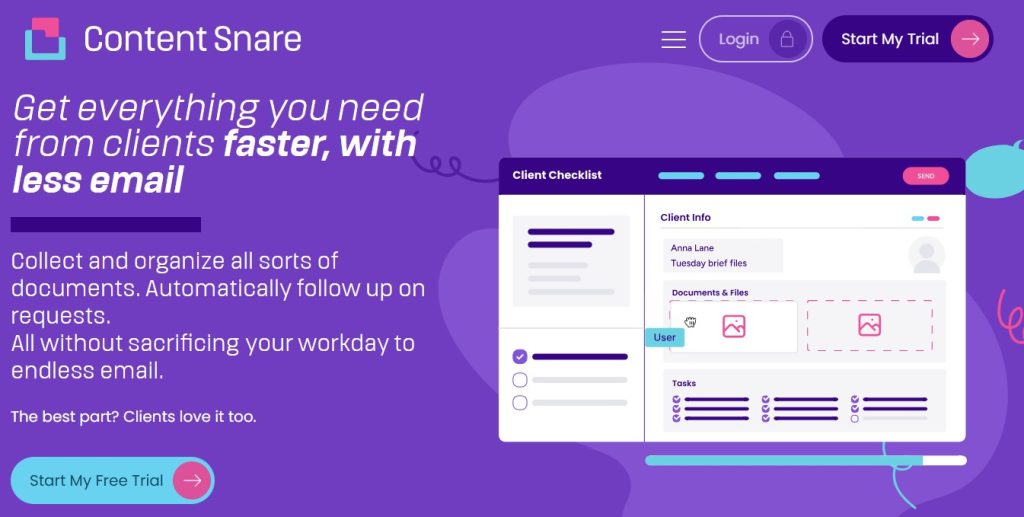
At its core, Content Snare helps you collect the right information from clients the first time without chasing or messy email threads. Here’s what this client portal software does especially well:
- Send and receive files securely in one branded platform
- ISO 27001–certified system with military-grade encryption
- Automated reminders that nudge clients without you lifting a finger
- Easy progress tracking so you always know what’s complete or missing
- Auto-save for clients so they never lose their work
- In-form comments enable clients to ask questions where they’re stuck
- Customizable form templates to speed up onboarding
Clients consistently highlight how much time they save after switching to Content Snare, particularly firms that manage large amounts of paperwork:
Content Snare has increased our efficiency by 50%, but we’re still continuously improving it. Data accuracy and completeness improved massively, I would say 70%.
Content Snare also integrates smoothly with the tools you already use, including Zapier, Make, Google Drive, and OneDrive, which makes it easy to build automated workflows without technical setup.
Sign up for a 14-day free trial to see Content Snare in action.
2. Portalstack: Best for fast-growing startups
Portalstack is a lightweight client portal built for teams that need to move quickly and keep clients in the loop without adding extra admin work. Startups often choose it because it’s simple to set up and flexible enough to support changing processes as the business grows. It’s a good fit if you want something cleaner than email but don’t need the full automation depth of larger platforms. Key features that make Portalstack appealing for fast-growing teams include:
- No-code setup so you can get clients onboarded in minutes
- Shared workspaces for files, tasks, and client communication
- Simple checklists to guide clients through what you need from them
- Role-based permissions to control access as your team scales
- Basic branding options to keep things professional
- Easy client messaging that keeps conversations organized
While Portalstack isn’t designed for heavy workflows or complex data collection, it’s a solid option for early-stage companies that need an organized place to work with clients as they grow. It keeps everything tidy and gives startups a portal that won’t slow them down.
3. Clinked: Best white-label client portal for small professional firms
Clinked is a simple client portal that shines when you want everything to look and feel like your own brand. Small professional firms, especially consultants and boutique agencies, use it to customize almost every part of the portal, from colors and logos to the login page and email notifications. It’s pretty straightforward and gives clients a familiar branded experience. Standout features for firms that want a fully white-labelled experience include:
- Custom domains and client-facing design elements
- File sharing with organized folder structures
- Group workspaces for different clients or projects
- Built-in chat and discussions to cut down on scattered communication
- Task lists to keep everyone aligned on what needs to happen
- Mobile apps so clients can access documents on the go
Clinked isn’t built for advanced workflow automation, but it delivers a polished and professional portal that feels like an extension of your firm, and not a third-party tool. Overall, Clinked fits the bill nicely if branded presentation is a priority and you want a simple space where clients can collaborate.
4. Encyro: Best for encrypted client file sharing

Encyro is built for firms that need a dependable way to exchange sensitive documents without worrying about security gaps. It focuses heavily on encryption and compliance: everything works through your browser or directly inside Outlook or Gmail, so you can keep your existing workflow while upgrading security. Here are the features that stand out for security-minded teams:
- Automatic, standards-compliant email encryption with no extra steps
- Secure file sharing that protects data in transit and at rest
- Compliance with major regulations like HIPAA, IRS, GLBA, GDPR, FINRA, and SOC 2
- Free electronic signatures for quick approvals
- Built-in invoicing so clients can receive files and make payments in one place
- Easy client access with no complicated setup required
Encyro doesn’t try to replace full client onboarding tools or workflow platforms, but it excels at what it’s designed for, which is safe communication and document exchange. If your priority is keeping client data protected while still making the process smooth for both sides, Encyro offers a straightforward solution.
5. HelpSpace: Best customer portal for managing client requests & support

Client portals are typically used for onboarding and ongoing collaboration, which is the focus of this post. But if you ended up here searching for a customer support portal, HelpSpace makes for a nice small-scale pick. This platform is a lightweight customer portal built for teams that need an easy way to manage support requests, track conversations, and give customers a simple place to check in on their tickets. Some of its main features include the following:
- A simple customer dashboard to submit requests and view ticket history
- Shared inbox and ticketing system for internal teams
- Knowledge base tools so customers can self-serve
- Simple file attachments and threaded conversations
- Lightweight automation for routing and responses
- Custom branding to keep the portal aligned with your business
HelpSpace won’t handle structured client onboarding, but that’s not what it’s built for. It’s an easy to use support portal that keeps incoming requests organized and gives customers one reliable place to communicate, making it a nice complement to a dedicated client portal when a business needs both.
Why are client portals better (and safer) than email?
We don’t like to pick on email, but it just isn’t built for the kind of back-and-forth most professional firms deal with. It’s familiar and convenient, sure, but it falls apart the moment you need to track multiple documents or follow up with clients.
Related: How secure is email? Hint: not secure enough
Client portals solve all of that by giving clients a single place to upload files, access your documents, answer questions, or see what’s still outstanding – no lost attachments and guessing whether someone actually saw your message.
They’re also far more secure. Modern portals use strong encryption and audit trails that meet strict compliance standards, things email doesn’t provide out of the box. For any business handling confidential information, a portal is much more convenient and a lot safer.
The SNARE method: A simple framework for choosing the best client portal
The SNARE method gives you a quick way to figure out which one will actually work for your business and your clients. It highlights the five elements that matter most when you’re collecting documents or running projects through a shared portal.
S.N.A.R.E. stands for:
- Security: Encryption, compliance, and built-in audit trails
- Navigation: How easy the portal is for clients to understand and use
- Automation: Reminders, workflows, form templates, and anything that saves you time
- Reliability: Uptime, support quality, and a proven track record
- Experience: The client-facing look and feel, including branding
Using SNARE helps you quickly spot which tools are polished and trustworthy, and which ones might slow you down. It’s a simple checklist, but it makes choosing the right portal a whole lot easier.
Learn what makes Content Snare the best client portal
With our intuitive form-builder and editable templates, it’s never been easier to create powerful data-gathering forms and organize your data. Work smarter and improve your client experience with Content Snare.
FAQ
What is a client portal and how does it work?
A client portal is a secure online space where clients can upload documents, answer questions, and access information from your business. It’s a platform that keeps everything organized in one place while ensuring that sensitive data is protected.
Why is Content Snare so popular among professional service firms?
Content Snare is a widely used client portal because it automates the entire document collection process, including reminders, checklists, templates, and progress tracking. That way, firms don’t have to chase clients manually. It’s also incredibly easy for clients to use, which reduces delays and confusion.
Are client portals safer than sending documents by email?
Yes, client portals are much safer than email. Email doesn’t offer strong encryption, access controls, or audit trails, which makes it risky for sharing financial, legal, or confidential information. On the other hand, client portals are built with security and compliance in mind, so your files stay protected from end to end.
Can Content Snare integrate with my existing systems?
Yes, Content Snare connects with tools like Zapier, Make, Google Drive, OneDrive, CRMs, and practice management apps so you can automate tasks and keep everything in sync with your existing workflows.
Deixe um comentário